Chasing Whiskers
(trailer coming soon)
About the Project
A comedic action game currently in development for Steam. You play as a grandma chasing and catching cats across a series of levels. As the AI programmer my responsibility is the cat AI: how they move, how they react to the player, and how they use the environment to evade capture.
Team: 24 (6 programmers, 8 designers, 10 artists )
Engine: Unreal Engine 5
Role: AI programmer
Status: In development
Overview
Cat AI for a comedy game lives or dies on feel. The cats need to seem genuinely evasive and a little unpredictable without ever feeling unfair or scripted. Each cat runs a six-state machine covering roaming, caution, fleeing, hiding, following, and patrolling. Transitions are driven by distance thresholds and timers, all exposed through a data asset so designers can tune each cat type independently without touching code.
1
2
3
4
5
6
7
states:
  Roam       → wanders the level using Lévy flight
  Caution    → spotted the player at medium range, walking away cautiously
  FleeFromPlayer → actively fleeing, using Lévy flight away from the player
  Hiding     → approaching a hiding spot, then hiding inside it
  FollowPlayer → following the player (used for friendly cat types)
  Patrol     → following a preset path between waypoints
The state machine in the cat’s tick checks distance to the player each frame and transitions accordingly:
1
2
3
4
5
6
7
8
9
10
11
12
13
14
15
16
17
18
19
each frame:
  dist = distance(player, cat)

  if state == Roam:
    if dist < cautiousTriggerRadius → enter Caution
    else → LevyRoam()

  if state == Caution:
    if dist < detectionRadius OR cautiousTimer expired → enter Flee
    if dist > comfortRadius → back to Roam
    else → walk cautiously away

  if state == FleeFromPlayer:
    try hiding spot → if found, enter Hiding
    if dist > comfortRadius AND fleeTimer expired → back to Roam
    else → LevyFlee()

  if state == Hiding:
    approach spot → once inside, hide until timer or player leaves
Lévy Flight Movement
A naive random walk produces movement that looks mechanical, because uniform step lengths don’t match how animals actually behave. Lévy flight solves this with a heavy-tailed distribution: most steps are short, but occasional long dashes are far more likely than a normal distribution would produce. In practice cats spend time in one area before suddenly bolting across the room, which reads as much more believable than constant jittery movement. Step lengths are sampled using an inverse power-law transform:
1
2
3
4
function GenerateLevyStep(minStep, maxStep, alpha):
    u = random(0, 1)
    step = minStep * pow(u, -1.0 / alpha)
    return clamp(step, minStep, maxStep)
For roaming, the direction is fully random. For fleeing, the direction is biased into a configurable angle window pointing away from the player, with the same Lévy step length distribution:
1
2
3
4
5
6
7
8
9
10
11
function GenerateFleePoint(origin, awayFromPlayer):
    fleeAngle = atan2(awayFromPlayer)
    halfWindow = fleeAngle / 2

    for each attempt:
        stepLength = GenerateLevyStep(fleeMin, fleeMax, fleeAlpha)
        angleOffset = random(-halfWindow, halfWindow)
        candidate = origin + polar(stepLength, fleeAngle + angleOffset)
        if candidate is on navmesh → return candidate

    return fallback position
Jumping and NavLink Integration
Cats can jump between elevated areas using Unreal’s nav link system. Hooking custom movement logic into nav link path flags is not covered in Unreal’s documentation, so getting this working required reading engine source directly to understand how off-mesh connection flags are set on path points.
The movement component detects when the current path segment has an off-mesh connection flag set on the path point:
1
2
3
4
function IsCurrentSegmentNavLink():
    cast active path to FNavMeshPath
    get flags on current path point
    return flags contains RECAST_STRAIGHTPATH_OFFMESH_CONNECTION
When a nav link segment is reached, the cat launches on a ballistic arc computed from the start and end positions with a configurable peak height. Gravity is applied each frame and the cat lands when it is falling, close to the target in 2D, and within vertical range:
1
2
3
4
5
6
7
8
9
10
11
12
13
14
15
16
17
18
function ComputeArcVelocity(start, end):
    peak = max(start.z, end.z) + arcPeakHeight
    g = gravityMagnitude

    tUp   = sqrt(2 * (peak - start.z) / g)
    tDown = sqrt(2 * (peak - end.z) / g)
    tTotal = tUp + tDown

    horizontalVelocity = (end.xy - start.xy) / tTotal
    verticalVelocity   = g * tUp
    return (horizontalVelocity, verticalVelocity)

each frame during arc:
    arcVelocity.z += gravity * dt
    move cat by arcVelocity * dt

    if falling AND dist2D(cat, linkEnd) < goalRadius AND abs(cat.z - linkEnd.z) < 7:
        enter Landing state → pause briefly → resume path
The probability of a cat choosing a nav link when fleeing scales with link length: short links (nearby jumps) have a high probability, long links have a lower one:
1
2
3
4
function ShouldUseNavLink(linkLength):
    t = inverseLerp(minLinkLength, maxLinkLength, linkLength)
    probability = lerp(maxProbability, minProbability, t)
    return random() < probability
BOIDS Steering
All cat movement is run through a steering component that combines BOIDS forces with path following. This keeps cats from overlapping each other and makes groups move more naturally.
Rather than handling separation logic separately per system, all cat movement runs through a single steering component that combines BOIDS forces with path following. This keeps cats from clipping through each other regardless of which state they’re in, and makes groups of fleeing or following cats move as a loose crowd rather than a stack.
1
2
3
4
5
6
7
8
9
10
11
12
13
14
15
16
17
18
19
function ComputeSteering(nextWaypoint):
    separation = sum of repulsion vectors from nearby cats
    cohesion   = direction toward average position of neighbors
    alignment  = direction of average velocity of neighbors

    if following player:
        leaderCohesion  = direction toward player
        leaderAlignment = direction of player velocity

    pathDirection = normalize(nextWaypoint - position)

    steering = separation  * weightSeparation
             + cohesion    * weightCohesion
             + alignment   * weightAlignment
             + leaderCohesion  * leaderCohesionWeight
             + leaderAlignment * leaderAlignmentWeight
             + pathDirection   * weightPath

    return normalize(steering) * speedDrive
Neighbor lookup avoids sphere overlap queries by instead iterating a static list of all active cats and checking distance directly, which proved cheaper in practice:
1
2
3
4
function UpdateNeighbors():
    for each cat in AllCats:
        if distance(self, cat) <= neighborRadius:
            add to neighbors
Settle System
Following cats presented a specific problem: without a stopping condition, a crowd of cats following the player constantly jostle and re-adjust even when fully caught up. The settle system solves this by having cats lock in place when they detect a settled neighbor or the player directly ahead, held for a minimum duration to avoid flickering.
1
2
3
4
5
6
7
8
9
10
11
12
13
14
15
function UpdateSettleState():
    if player is moving:
        if player just started moving → reset random start delay
        wait for delay → clear settled state
        return

    frontBlocked = HasSettledNeighborOrPlayerInFront()

    if frontBlocked:
        lowVelocityTimer += dt
    else:
        lowVelocityTimer -= dt * 2

    if frontBlocked AND lowVelocityTimer >= settleTimeRequired:
        bIsSettled = true
Hiding System
When a cat decides to hide, it searches for a nearby CatHidingSpot actor that aligns with its current movement direction. The probability of choosing a spot falls off with distance from the spot centre:
1
2
3
4
5
6
7
8
9
10
11
12
13
14
function FindBestHidingSpot():
    moveDir = normalize(fleeTarget - position)

    for each HidingSpot in world:
        if occupied → skip
        if spot is not within movement cone angle → skip
        if fleeTarget is not inside spot detection radius → skip

        distProb = square(1 - dist / spotRadius)
        if random() > hideChance * distProb → skip

        score by alignment with move direction

    return best scoring spot
Once a spot is chosen the cat approaches it on the navmesh and teleports to the hide position with its mesh hidden. Each spot plays a pop-in and shake animation driven by a small state machine on the hiding spot actor. When the cat exits it re-appears at the best exit point away from the player:
1
2
3
4
5
on exit:
    exitPoint = spot exit point furthest from player
    snap cat to navmesh at exit point
    restore mesh visibility
    enter cooldown → return to Roam
Patrol Cats
A subclass of the cat adds a patrol path component. In roam state the cat follows waypoints rather than using Lévy flight. At each waypoint there is a chance of resting briefly before continuing, with separate short and long rest durations. The path supports both looping and ping-pong traversal:
1
2
3
4
5
on reach waypoint:
    rand = random()
    if rand < longRestChance  → rest for random(minLong, maxLong)
    elif rand < shortRestChance → rest for random(minShort, maxShort)
    advance to next point (loop or ping-pong)
The same state machine transitions apply: if the player gets close enough, a patrol cat switches to caution and then flee just like a roaming cat.
Patrol Path Editor Tool
Patrol paths are set up through a custom editor visualizer built with Unreal’s FComponentVisualizer system. Waypoints are drawn as spheres in the viewport with lines connecting them. Clicking a sphere selects it and activates Unreal’s standard transform widget so the point can be dragged directly in the scene. Points that fall outside the navmesh are drawn in orange as a warning to the designer.
1
2
3
4
5
6
7
8
9
10
11
12
13
14
on draw:
    for each waypoint:
        color = selected → red
                off-navmesh → orange
                normal → yellow
        draw sphere with hit proxy carrying point index
        draw line to next point

on click:
    if hit proxy is patrol point → select it, return widget location

on drag:
    project new position onto navmesh if possible
    update local-space point in component
Paths are saved as data assets and loaded at runtime. The visualizer also has keyboard and context menu buttons to add and remove points directly in the editor.
Data-Driven Design
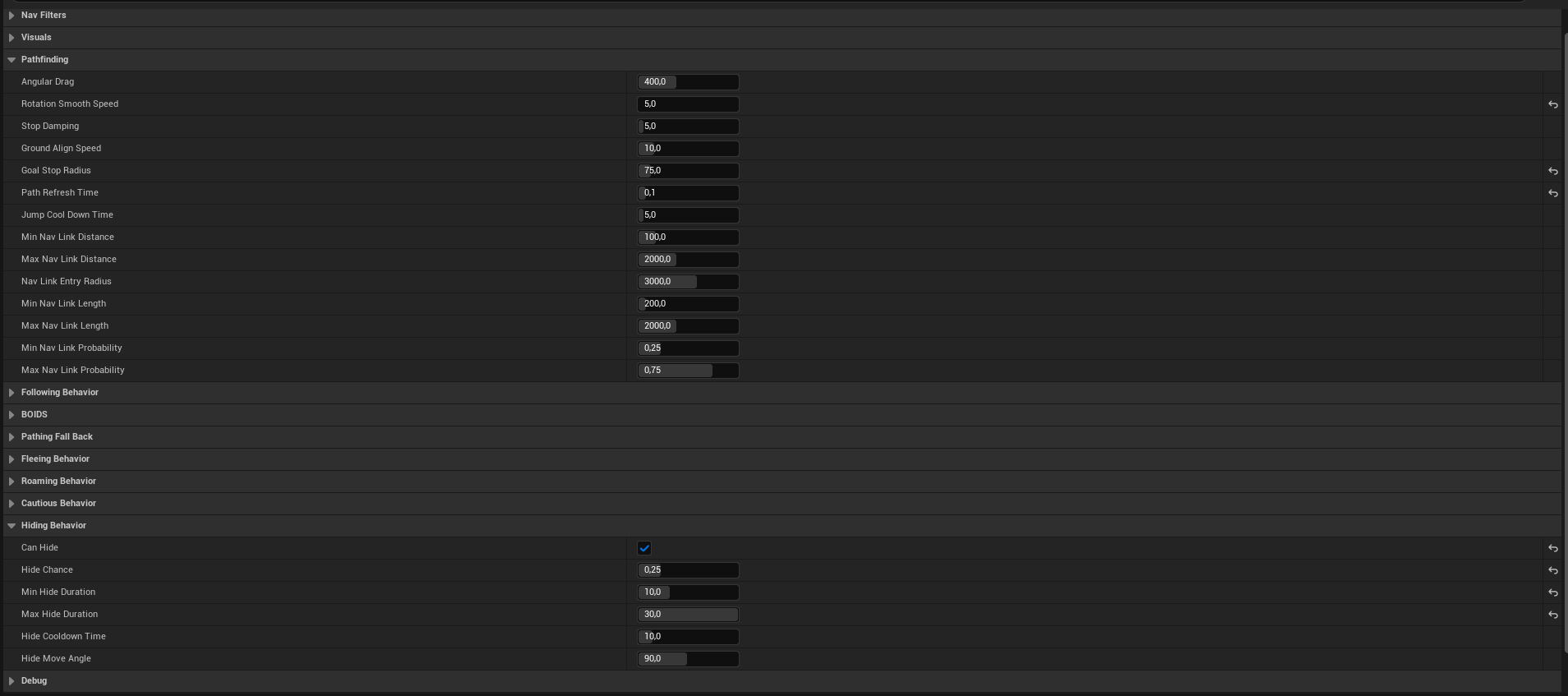
All cat parameters are stored in a UCatData asset rather than hardcoded. Detection radii, movement speeds, Lévy parameters, rest durations, BOIDS weights, hide probabilities, and nav link settings are all exposed through the asset. This lets designers create different cat types and tune them without touching code, and makes it straightforward to add new variants by duplicating an existing asset.
Reflection
The most interesting constraint on this project was that the AI had to be fun for the player to play against, not just technically correct. A cat that always found the optimal hiding spot or escape route would be frustrating rather than funny. A lot of the tuning work was deliberately making cats beatable in satisfying ways: the flee angle window, the hide probability falloff, the nav link chance scaling. Getting behavior that felt alive without feeling cheap was the actual design problem underneath all the systems.