Godot behavior tree editor
About the Project
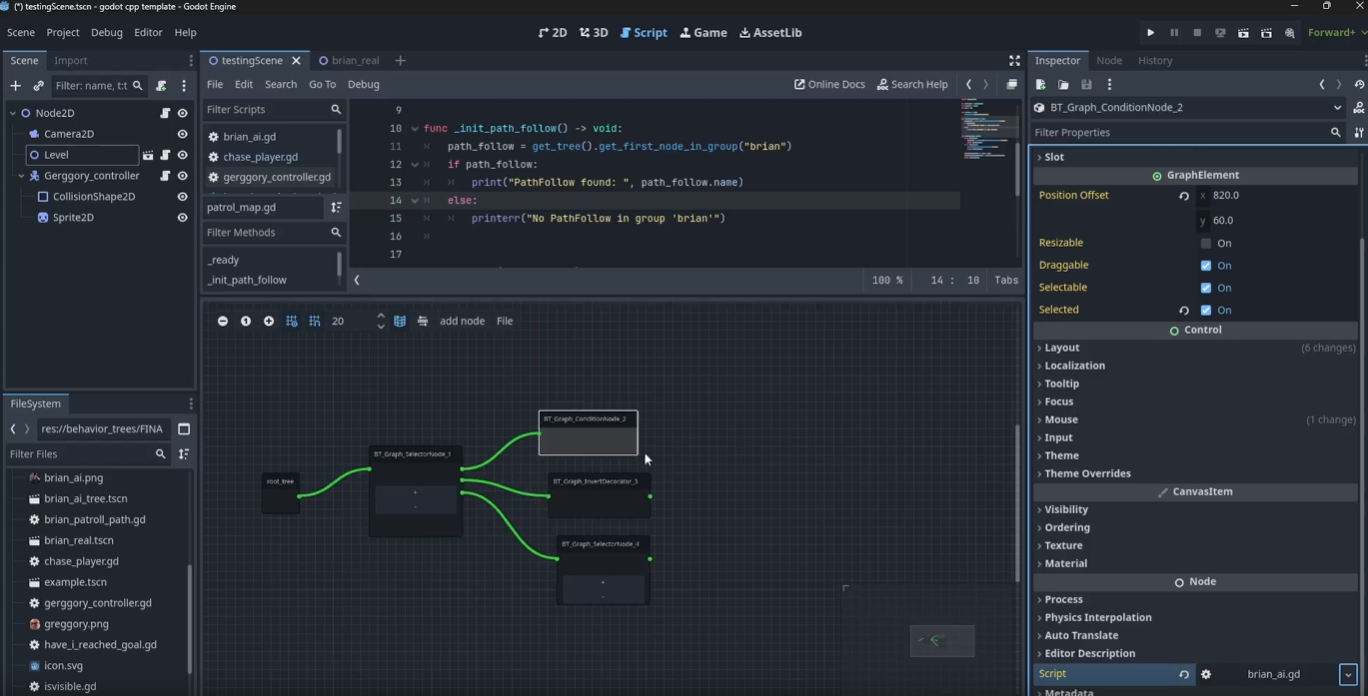
A behavior tree plugin for Godot, built as a GDExtension in C++. The plugin adds a visual graph editor to the Godot editor for building and saving behavior trees, a runtime system for executing them, and a set of built-in node types covering the standard behavior tree building blocks.
Team: solo
Durations 14 weeks
Engine: Godot 4 (GDExtension / c++)
Overview
I built a behavior tree plugin for Godot 4 as a GDExtension in C++. It adds a visual graph editor to the Godot editor, a runtime execution system, and a full set of standard node types. The goal was something that felt native to the engine: trees saved as Godot resources, the editor living in the bottom panel, and condition/action nodes scriptable in GDScript so designers never need to touch C++.
The most valuable part of the project was building something that integrates deeply with an existing editor rather than running standalone. Navigating Godot’s GDExtension API, working around undocumented engine bugs, and designing for two audiences (C++ programmers and GDScript designers) gave me a much better sense of what plugin and tooling development actually involves.
The Graph Editor
The editor is built on Godot’s GraphEdit node and registered as an editor plugin through the GDExtension API. Before accepting a connection, it validates that the target node doesn’t already have a parent and that the source slot is free, making it impossible to build a malformed tree in the editor.
Connections are validated before being accepted. The editor checks that the target node does not already have a parent and that the source slot is not already occupied, preventing invalid tree structures from being built:
1
2
3
4
5
6
7
8
9
10
11
12
13
14
15
16
17
18
19
20
21
22
23
24
25
26
void BT_GraphEdit::_on_connection_request(const String &from, int from_slot,
                                           const String &to, int to_slot)
{
    if (to_node->parent)
    {
        godot::print_error("node already has a parent");
        return;
    }

    Array connections = graph_edit->get_connection_list();
    for (int j = 0; j < connections.size(); j++)
    {
        Dictionary conn = connections[j];
        if (conn["from_node"] == from_node->get_name() &&
            conn["to_node"] == child->get_name())
        {
            int occupied_slot = conn["from_port"];
            if (occupied_slot == from_slot)
            {
                godot::print_error("Slot already in use by another child");
                return;
            }
        }
    }
    // connect and update parent/child references
}
Trees are serialized to a BT_Tree_Resource holding a flat list of BT_node_data objects, each storing the node type, name, script, editor position, and child IDs. This lets trees be saved as standard Godot .tres files and loaded back into either the editor or the runtime without any special handling.
GDScript Integration
Condition and action nodes support both C++ and GDScript. At initialisation, the node checks whether a condition_to_check() method exists on the attached script. If it does, calls are routed to GDScript. If not, it falls back to the C++ virtual. This means the same node type works for a C++ programmer extending it natively and a designer writing a quick script without touching the plugin:
1
2
3
4
5
6
7
8
9
10
11
12
13
int BT_ConditionNode::evaluate(float dt)
{
    if (condition_call.is_valid())
    {
        Variant ret = condition_call.callv({ dt });
        return static_cast(ret) ? STATUS_SUCCESS : STATUS_FAILURE;
    }
    else
    {
        bool result = condition_to_check();
        return result ? STATUS_SUCCESS : STATUS_FAILURE;
    }
}
The Runtime
At runtime a BT_Tree node reads a BT_Tree_Resource, reconstructs the tree, and ticks the root node at a configurable rate. The tickrate prevents the tree from running every frame, which is useful for AI where running at 10 ticks per second is often more than sufficient:
1
2
3
4
5
6
7
8
9
10
11
12
13
void BT_Tree::_process(double delta)
{
    if (Engine::get_singleton()->is_editor_hint()) return;

    float ticktime = 1.0f / TickRate;
    timer += delta;
    if (timer >= ticktime)
    {
        timer -= ticktime;
        int int_status = root->_update(delta);
        set_status(static_cast(int_status));
    }
}
Tree construction maps node IDs to instances then links children in a second pass, keeping instantiation and wiring separate:
1
2
3
4
5
6
7
8
9
10
11
12
13
14
15
16
17
18
19
20
21
22
23
24
25
26
27
28
29
30
31
32
33
void BT_Tree::CreateTree()
{
    HashMap id_to_node;

    for (int i = 0; i < nodes.size(); i++)
    {
        Ref data = nodes[i];
        String type = data->get_node_type();
        BT_Node *node = nullptr;

        if (type == "BT_Graph_SequenceNode")      node = memnew(BT_SequenceNode);
        else if (type == "BT_Graph_SelectorNode")  node = memnew(BT_SelectorNode);
        else if (type == "BT_Graph_ActionNode")    node = memnew(BT_ActionNode);
        else if (type == "BT_Graph_ConditionNode") node = memnew(BT_ConditionNode);
        // ... other types

        node->set_name(data->get_name());
        node->set_script(data->get_script());
        id_to_node[data->get_id()] = node;
    }

    for (int i = 0; i < nodes.size(); i++)
    {
        BT_Node *parent_node = id_to_node[data->get_id()];
        Array children_ids = data->get_children_ids();
        for (int j = 0; j < children_ids.size(); j++)
        {
            BT_Node *child_node = id_to_node[children_ids[j]];
            parent_node->add_child(child_node);
            parent_node->add_bt_child(child_node);
        }
    }
}
Node Types
The plugin covers the standard behavior tree building blocks: sequence, selector, parallel, action, condition, invert decorator, repeater decorator, and wait node. Most of these are straightforward to implement once the core update loop is in place. The more interesting design problem came from the parallel node.
Reactive Nodes and the Parallel Problem
“Implementing the parallel node surfaced a subtle problem with standard memory-based sequences and selectors: once a branch starts running, it resumes from where it left off next tick. Inside a parallel node, this means a branch can stay active even after the conditions that triggered it have changed.”
In the demo below, a timer runs in parallel with a condition check. With standard memory-based nodes, once the sequence begins running the condition branch is not re-evaluated, so the agent never reacts to the player entering its line of sight:
The fix was adding reactive variants of the sequence and selector that re-evaluate from the first child every tick instead of resuming. This lets conditions interrupt ongoing behaviour, which is what you need for anything event-driven:
1
2
3
4
5
6
7
8
9
10
int BT_ReactiveSequenceNode::_update(float dt)
{
    for (int i = 0; i < child_nodes.size(); i++)
    {
        BT_Node *child = Object::cast_to(child_nodes[i].operator Object *());
        int status = child->_update(dt);
        if (status != STATUS_SUCCESS) return status;
    }
    return STATUS_SUCCESS;
}
Saving and Loading
Trees are saved and loaded as standard Godot .tres resource files, keeping them consistent with how the engine handles its own data. The main challenge was that Godot’s built-in serialization only applies to scene tree nodes. Since the behavior tree lives entirely inside the plugin, I had to hook into the engine’s property system manually. I also ran into an engine bug introduced in Godot 4.3 where serializing arrays of custom GDExtension resources was silently broken. TypedArrays, sub-resources, and Dictionaries all failed without useful error messages. It was obscure enough that it had barely been reported. The fix was overriding _get(), _set(), and _get_property_list(), which are the callbacks Godot uses when reading and writing properties during serialization. Defining those explicitly gave me control over exactly how the resource array was handled, and it worked.
1
2
3
4
5
6
7
8
9
10
11
12
13
14
15
16
17
18
19
20
21
void BT_Tree_Resource::_get_property_list(List<PropertyInfo> *p_list) const
{
    p_list->push_back(PropertyInfo(Variant::OBJECT, "root_node",
        PROPERTY_HINT_RESOURCE_TYPE, "BT_node_data"));
    p_list->push_back(PropertyInfo(Variant::ARRAY, "all_nodes",
        PROPERTY_HINT_ARRAY_TYPE, "Resource/BT_node_data"));
}

bool BT_Tree_Resource::_set(const StringName &p_name, const Variant &p_value)
{
    if (p_name == StringName("all_nodes")) { all_nodes = p_value; return true; }
    if (p_name == StringName("root_node")) { root_node = p_value; return true; }
    return false;
}

bool BT_Tree_Resource::_get(const StringName &p_name, Variant &r_ret) const
{
    if (p_name == StringName("all_nodes")) { r_ret = all_nodes; return true; }
    if (p_name == StringName("root_node")) { r_ret = root_node; return true; }
    return false;
}