Nakon
About the Project
Nakon is a first-person horde shooter inspired by Call of Duty Zombies, built on the custom Firewasp engine over 8 weeks. Players fight through escalating waves of enemies, spending points to unlock weapons, buy perks, and purchase power-ups dropped by enemies.
This project grew directly out of the custom fps engine project. The same engine team carried the codebase forward into the game, so a lot of the engine-level systems used here are ones I built or improved during both phases.
Team: 12 people (9 programmers, 3 artists)
Duration 8 weeks
Engine: Custom engine
Play it: itch.io
My Role
Beyond programming I was the only designer on the team. Early on I wrote the game documentation, the worldbuilding, and a short lore piece that gave everyone a shared creative direction to work from. On the programming side I owned the interactables system, enemy variants, navigation, and wave scaling, and did the balance and polish pass in the final sprint.
Interactables
The most substantial system I built for Nakon was the interactables: wall buys, perk machines, doors, the upgrade station integration, and enemy drop power-ups. All of these run through a shared interaction system and are placed and configured entirely in the editor.
Power-up Drops
When an enemy dies it rolls against a set of PowerupPreset components placed in the scene. Each preset controls what type of drop it spawns, at what probability, and whether it is active at all. This keeps tuning entirely out of code and lets designers iterate on drop rates without a recompile:
1
2
3
4
5
6
7
8
struct PowerupPreset
{
    std::string ModelPath = "models/Sphere.gltf";
    Pickup::PickUpType Type;
    float Chance;
    bool Enabled;
    static void Inspector(Entity entity);
};
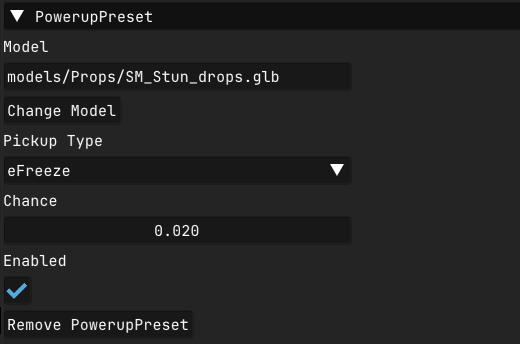
The spawn function collects all eligible presets, picks one at random from that pool, then creates the pickup entity with a sine-driven float animation and a random phase offset so multiple drops in the same spot do not move in sync:
1
2
3
4
5
6
7
8
9
10
11
12
13
14
15
16
17
18
19
void InteractableSystem::TrySpawnPowerUp(vec3 spawnPos)
{
    std::vector<PowerupPreset> eligiblePresets;
    for (const auto [entity, preset] : Engine.ECS().View<PowerupPreset>().each())
    {
        if (preset.Enabled && GetRandomNum(0.0f, 1.0f) <= preset.Chance)
            eligiblePresets.push_back(preset);
    }
    if (eligiblePresets.empty()) return;

    int index = static_cast<int>(GetRandomNumber(0.0f, static_cast<float>(eligiblePresets.size())));
    const auto& chosenPreset = eligiblePresets[index];

    entt::entity powerUp = Engine.ECS().CreateEntity();
    auto& drop = Engine.ECS().CreateComponent<Pickup>(powerUp, chosenPreset.Type);
    drop.yPos = spawnPos.y + 0.6f;
    drop.phaseOffset = GetRandomNumber(0.0f, 2.0f * 3.14f);
    // model, rimlight, audio...
}
Each effect type is a component on the player. When a drop is collected the component is created. If the player picks up the same type while it is already active the timer resets rather than stacking. When the duration expires the component removes itself and the effect ends. This makes adding new effect types very simple since each one is fully self-contained:
1
2
3
4
5
6
7
8
9
if (auto* instaKill = Engine.ECS().TryGet<Instakill>(playerEntity))
{
    instaKill->Timer += dt;
    if (instaKill->Timer > instaKill->EffectDuration)
    {
        weaponSys.SetInstaKill(false);
        Engine.ECS().RemoveComponent<Instakill>(playerEntity);
    }
}
Pickup collection runs a distance check each frame. When the player is close enough, the pickup entity is deleted, the appropriate component is added to the player, and a spatial audio cue plays:
1
2
3
4
5
6
7
8
9
10
11
12
13
14
15
16
17
18
19
20
21
22
const auto dist = distance(playerTransform.GetTranslation(), transform.GetTranslation());
if (dist <= m_pickupRadius)
{
    Engine.SpatialAudio().PlaySound(entity, false);
    Engine.ECS().DeleteEntity(entity);
    switch (pickup.Type)
    {
        case Pickup::PickUpType::eInstaKill:
            weaponSys.SetInstaKill(true);
            Engine.ECS().CreateComponent<Instakill>(playerEntity);
            break;
        case Pickup::PickUpType::eNuke:
            Engine.ECS().CreateComponent<Nuke>(playerEntity);
            aiSys.Nuke();
            break;
        case Pickup::PickUpType::eFreeze:
            aiSys.SetFreezeAgents(true);
            Engine.ECS().CreateComponent<Freeze>(playerEntity);
            break;
        // ...
    }
}
Wall Buys and Perks
Wall buys and perk machines use the same interaction logic as the drops. Both are defined as components with an inspector so they can be placed and configured from the editor. The five perks (health boost, double projectiles, faster reload, headshot damage increase, and ammo return on kill) each apply a different passive effect through the weapon and character systems:
1
2
3
4
5
6
7
8
9
10
11
12
13
14
15
16
17
18
19
20
21
22
struct WallBuy
{
    int unlockCost;
    bool unlocked = false;
    enum class Weapons { Default, Shotgun, Rifle } weapons;
    static void Inspector(Entity entity);
};

struct PerkVendor
{
    int Cost = 0;
    bool used = false;
    enum class Perks
    {
        eJuggernog,   // health boost
        eDoubleTap,   // double projectiles fired
        eSpeedCola,   // faster reload
        eDeadshot,    // increased headshot damage
        eVultureAid   // returns ammo to magazine on kill
    } Perk;
    static void Inspector(Entity entity);
};
Enemies
Nakon has three enemy variants. All three share the same AgentAi component and a single SpawnAgent function that sets stats, loads the correct model, sets up animation transitions, and creates the physics body based on the type passed in. Adding a new variant is a matter of adding a case without touching any of the AI logic:
1
2
3
4
5
6
7
8
9
10
11
12
case AgentAi::Type::explody:
{
    ai.aiSettings.health = 150;
    ai.aiSettings.damage = 75;
    ai.aiSettings.speed = 0.5f;
    ai.attackSettings.firingSpeed = 3;
    ai.capsuleHalfHeight = 0.9f;
    ai.capsuleRadius = 1.2f;
    ai.deathTimer = 1.5f;
    Engine.ECS().CreateComponent(entity);
    // load model, setup animations, setup physics body...
}
Health also scales per wave at spawn time using the round count, so enemies get progressively tougher as the game goes on without needing separate tuning per wave:
1
2
3
4
float scaledHealth = ai.aiSettings.health * ai.aiSettings.healthScale;
ai.aiSettings.health = ai.aiSettings.health +
    ((scaledHealth - ai.aiSettings.health) / ai.aiSettings.RoundScaleFactor) *
    Engine.ECS().GetSystem().GetWaveCount();
Head Hitboxes
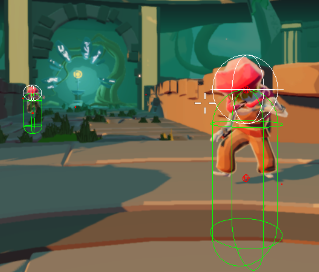
Each enemy has a separate sphere-shaped physics body as a child entity for the head, enabling headshot detection. Getting the aim assist raycast to recognise these correctly required a parent check, since a hit on the head hitbox returns the child entity rather than the agent itself:
1
2
3
4
5
6
7
8
9
10
11
12
13
14
15
16
17
18
19
20
void AgentBehaviour::SetupHeadHitBox(JPH::SphereShapeSettings& sphereSettings,
                                     const entt::entity entity,
                                     glm::vec3 position,
                                     const JPH::EMotionType& motionType,
                                     const JPH::ObjectLayer& inObjectLayer)
{
    auto& bodyInterface = joltSystem->GetBodyInterface();
    const auto& shape = sphereSettings.Create().Get();

    JPH::BodyCreationSettings bodySettings(shape,
                                           bee::physics::ToJolt(position),
                                           JPH::Quat::sIdentity(),
                                           motionType,
                                           inObjectLayer);

    bodySettings.mUserData = static_cast(entity);
    JPH::BodyID bodyID = bodyInterface.CreateAndAddBody(bodySettings, JPH::EActivation::Activate);
    bee::Engine.ECS().CreateComponent(entity, bodyID.GetIndexAndSequenceNumber());
    bee::Engine.ECS().Get(entity).bodyId = bodyID;
}
1
2
3
4
5
6
7
8
9
// aim assist raycast - check agent directly, or via parent for head hitboxes
if (Engine.ECS().Has(hitEntity)) return hitEntity;

if (auto* transform = Engine.ECS().TryGet(hitEntity))
{
    auto parent = transform->GetParent();
    if (parent != entt::null && Engine.ECS().Has(parent))
        return hitEntity;
}
Attack Logic
When an enemy enters its attack state its movement is stopped and it waits for a cooldown timer. Once the timer is up it performs a frustum check to confirm the player is actually in front of it before firing. After the attack there is a short window before the agent can transition back, giving the animation time to finish cleanly:
1
2
3
4
5
6
7
8
9
10
11
12
13
14
15
16
17
18
19
20
21
22
23
24
25
26
27
28
29
30
31
32
33
34
35
36
void AiManager::ZombieCombat(AgentAi& ai, DetourAgent&, dtCrowd* crowd,
                              Transform& agentTransform, Transform& playerTransform,
                              const float& dt)
{
    float finalVelocity[3] = {0, 0, 0};
    crowd->requestMoveVelocity(ai.agentId, finalVelocity);

    if (ai.gunTimer >= ai.attackSettings.firingSpeed && !ai.attacked)
    {
        ai.gunTimer = 0;
        if (IsInsideFrustum(ai,
                            agentTransform.GetTranslation() + ai.visionOffset,
                            playerTransform.GetTranslation()))
        {
            ShootRay(ai, agentTransform.GetTranslation(), player);
        }
        ai.attacked = true;
    }

    if (ai.attacked)
    {
        ai.timer += dt;
        if (ai.timer >= ai.attackSettings.afterAttackDelay)
        {
            ai.timer = 0;
            if (!IsInsideFrustum(ai,
                                 agentTransform.GetTranslation() + ai.visionOffset,
                                 playerTransform.GetTranslation()))
            {
                ai.state = AgentAi::Combat;
                ai.attacked = false;
            }
        }
    }
    else ai.gunTimer += dt;
}
Navigation
The navigation system came from the engine block and was extended during this project. The interesting problem was getting natural crowd separation without Detour’s built-in avoidance making enemies feel too polite. The solution was to send velocity through the crowd system to trigger its separation behaviour, then intercept the result before it is applied and route it through the custom path following logic instead. Movement is then constrained to the navmesh surface using moveAlongSurface, which prevents agents from drifting off edges on uneven geometry:
1
2
3
4
5
6
7
8
9
10
11
12
13
14
15
16
17
18
19
20
21
22
23
glm::vec3 desiredVelocity = glm::mix(m_velocity, direction * maxSpeed, smoothing);

float moveTarget[3] = {
    m_position.x + desiredVelocity.x * 0.1f,
    m_position.y + desiredVelocity.y * 0.1f,
    m_position.z + desiredVelocity.z * 0.1f
};

if (dtStatusSucceed(m_navQuery->moveAlongSurface(startRef,
                                                  glm::value_ptr(m_position),
                                                  moveTarget,
                                                  m_queryFilter,
                                                  result,
                                                  visited,
                                                  &visitedCount,
                                                  16)))
{
    glm::vec3 clampedDirection = glm::normalize(glm::make_vec3(result) - m_position);
    m_velocity = clampedDirection * maxSpeed;
}

float finalVelocity[3] = {m_velocity.x, m_velocity.y, m_velocity.z};
m_crowd->requestMoveVelocity(ai.agentId, finalVelocity);
An attempt was also made to implement a dynamic tile navmesh to support doors as runtime obstacles. Partial geometry generated correctly but the full implementation wasn’t completed before the deadline. The approach was sound, the blocker was time rather than a fundamental technical problem, and it’s something I would want to finish given another sprint. 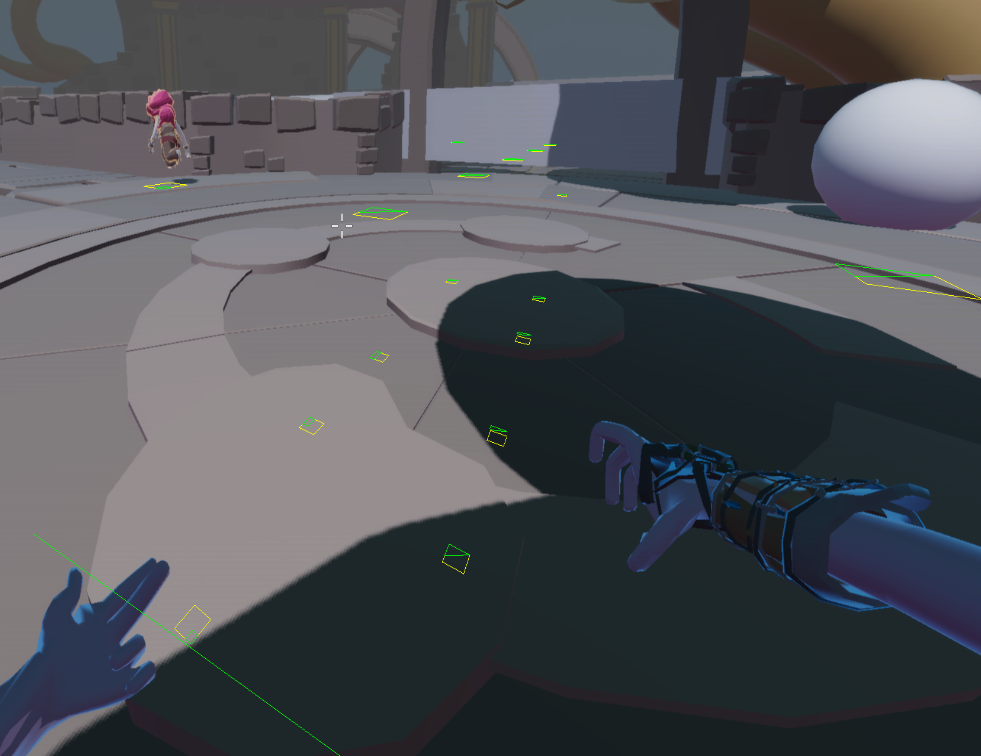
Wave Scaling
Nakon’s wave scaling formula is adapted from the one Call of Duty Zombies uses publicly, with the tail offset tuned for Nakon’s pacing. The exploding and tall variants ramp in separately from specific wave thresholds using a power curve, so the composition of each wave shifts meaningfully rather than just getting numerically harder:
1
2
3
4
5
6
7
8
9
10
11
12
13
14
15
16
17
18
19
20
21
22
m_currentWave.m_zombieCount = (int)floor(
    0.000058f * m_waveCount * m_waveCount * m_waveCount +
    0.074032  * m_waveCount * m_waveCount +
    0.718119  * m_waveCount + 7.738699f);

// exploding variant ramps in from wave 3
if (m_waveCount >= 3)
{
    float ramp = std::pow(((float)m_waveCount - 3) / m_exploderScale, m_ExploderWavePower);
    ramp = std::min(ramp, 1.0f);
    m_currentWave.m_exploderCount = static_cast(
        std::floor(m_currentWave.m_zombieCount * (ramp * m_exploderMaxFraction)));
}

// tall variant ramps in from wave 5
if (m_waveCount >= 5)
{
    float ramp = std::pow(((float)m_waveCount - 5) / m_tallScale, m_tallWavePower);
    ramp = std::min(ramp, 1.0f);
    m_currentWave.m_tallBoyCount = static_cast(
        std::floor(m_currentWave.m_zombieCount * (ramp * m_tallMaxFraction)));
}
Polish
The final sprint was balance and feel work driven by playtesting. Weapons and enemies got a tuning pass, interactables got rimlight highlighting so players could see what they could interact with at a glance, and directional arrows were added to the upgrade path after playtests consistently showed players losing track of where to go.
The rimlight system resets all active rimlights at the start of each frame, then re-enables only the one currently being aimed at. This avoids any state getting stuck on if the player looks away mid-interaction:
1
2
3
4
5
6
7
for (auto [_e, interact, rim] : Engine.ECS().View().each())
{
    if (interact.proximityActive) rim.HasRimLighting = false;
}
// then re-enable only the hovered one
if (auto* interact = Engine.ECS().TryGet(parent))
    CheckForRimLightActivation(parent, *interact);
Reflection
Working on a custom engine game back-to-back with building the engine itself was a different experience from using an established tool. A lot of the time I would have spent reading documentation went into reading our own codebase instead, which made it much clearer where the engine’s limits were and where I had room to work around them. The navigation crowd separation problem is a good example: knowing how the system was built made it obvious why the default avoidance felt wrong and what lever to pull to fix it. That kind of familiarity is something you don’t get from dropping into an existing engine mid-project.